Debugging Minecraft Network Traffic
This document describes how to debug Minecraft network traffic to inspect how packets are sent with wireguard.
If you don’t want to use wireguard then this project can come in handy for you: https://github.com/adepierre/SniffCraft
Prerequisites
Section titled “Prerequisites”First, encryption and compression must be disabled.
The compression threshold should be set to 1024.
You can find it in this file config/steel_config.json5, which will be generated after the first start.
You will need:
- A local Minecraft server
- Wireshark running with root privileges (or proper permissions) to capture traffic on
localhost
Captured packets can be compared with the official protocol documentation: https://minecraft.wiki/w/Java_Edition_protocol/Packets
This helps to understand all packet types and what they describe.
Wireshark Setup
Section titled “Wireshark Setup”You can start Wireshark immediately and observe the packets, but for better readability it is recommended to compile and use a Wireshark dissector plugin.
Minecraft Wireshark Dissector
Section titled “Minecraft Wireshark Dissector”Repository: https://github.com/Nickid2018/MC_Dissector
Requirements:
- Wireshark 4.6 (recommended)
The best recommendation is to compile the plugin yourself using the instructions in the ci.yaml file of the
repository.
For Linux:
After compilation, copy the generated .so file to:
~/.local/lib/wireshark/plugins/<Wireshark Version>/epanFor Windows:
After compilation, copy the generated .dll file to:
plugins/<Wireshark Version>/epanAdjust the path according to your Wireshark version.
Protocol Data Repository
Section titled “Protocol Data Repository”Clone the protocol data repository:
https://github.com/Nickid2018/MC_Protocol_Data
Wireshark Configuration
Section titled “Wireshark Configuration”Start Wireshark as a non root user! (on Linux, for loopback capture, your user must be in the wireshark group).
Then navigate to:
Preferences → Protocols → Minecraft
Select the protocol and set the path to the cloned MC_Protocol_Data repository.
After that, restart Wireshark.
Useful Display Filter
Section titled “Useful Display Filter”To get a better overview of Minecraft traffic, use this filter:
mcjeResult
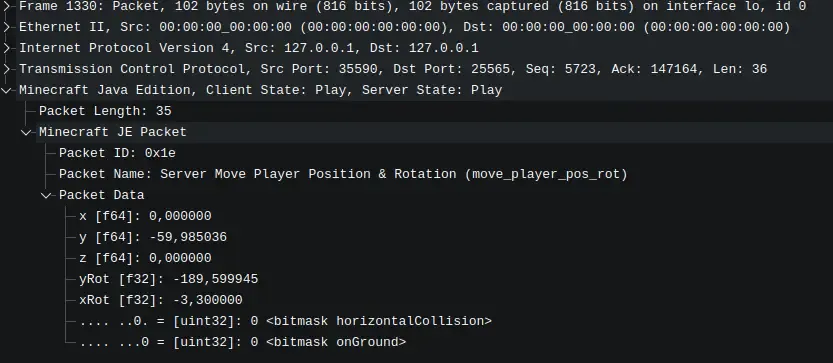
Section titled “Result”At the end, the packets will be far more readable than raw network data, making protocol debugging much easier.
Another useful resources
Section titled “Another useful resources”These resources can you help to get a deeper understanding: